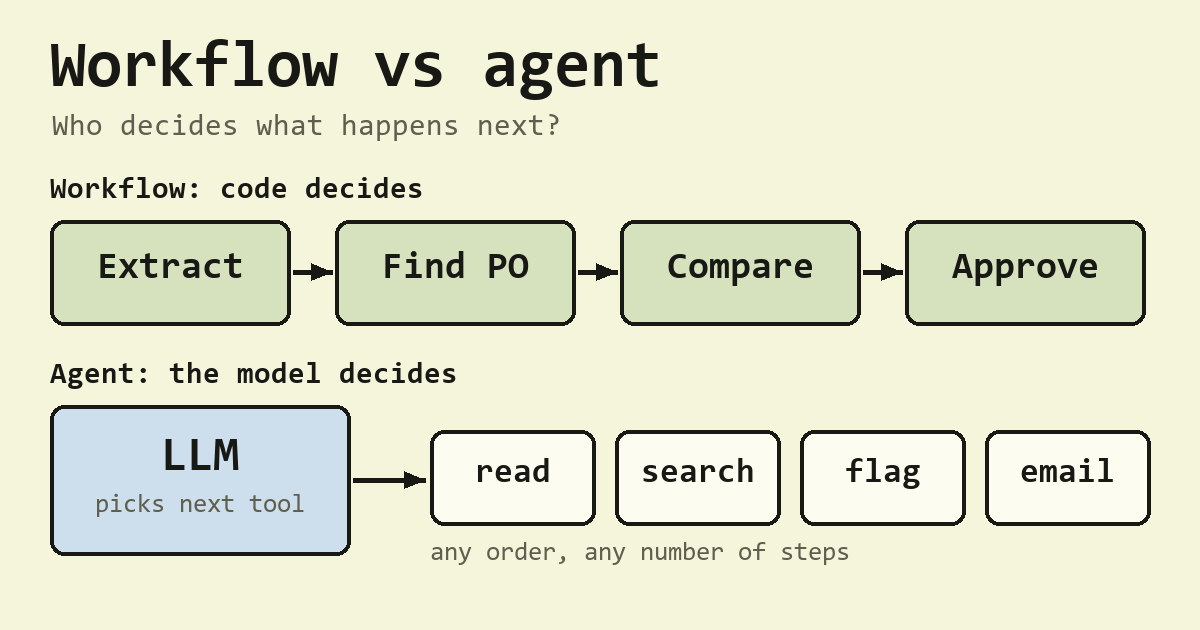
The workflow vs agent difference comes down to who decides what happens next. In an AI workflow, code written in advance decides, and in an AI agent, the LLM decides at run time, which is why each path through a workflow can be tested while the full range of behavior has to be measured over many runs.
A chatbot is the third case, where a person decides after every reply. Here is the AI agent vs workflow comparison with the chatbot added:
| Chatbot | Workflow | Agent | |
|---|---|---|---|
| Who chooses the next step | The human, after each reply | Code, written in advance | The model, at run time |
| Number of model calls | One per human turn | Fixed or bounded by the design | Variable, decided by the model |
| Paths through the system | Driven by the conversation | Can be listed, and each can be tested | Too many to list |
| Unforeseen situations | Handled by the human | Handled only if someone wrote a branch | Handled, within its tools |
| Typical failure | Wrong answer | Wrong branch for a case nobody planned | Wrong plan, loops, and compounding errors |
Table of Contents
Workflow vs agent comes down to who decides what happens next
Every program has control flow, the logic that picks which step runs next. In a system built on a language model, that logic can live in three places: in a person, in code, or in the model itself. Those three places are the chatbot, the workflow, and the agent.
The word “agent” is older than LLMs. The standard AI textbook by Russell and Norvig defines an agent as anything that perceives its environment through sensors and acts on it through actuators. By that broad definition even a thermostat counts, so for LLM systems a sharper test is useful, and control flow gives you one.
So tools do not make something an agent, and neither do several model calls. A pipeline can call a model ten times and use five tools and still be a workflow, because code picked every step. A system becomes an agent when the model directs the sequence.
That also answers a question people often search: are AI agents and AI workflows the same? No. They can use the same model and the same tools, and they still differ in who owns the control flow.
Chatbot vs agent, one reply or a loop
A chatbot and an agent can run on the same model. In a chatbot, the model replies once and a person decides what to ask next. In an agent, the reply can be a request to do something, software carries it out, and the model reads the result and chooses again. That cycle is the agent loop, and it keeps going until the task is done or a limit stops it.
That read, act, and observe loop has a name in the research literature. The ReAct paper (Yao et al., 2023) showed language models alternating between a written thought, an action such as a search, and the observation that comes back, and most agent frameworks today follow the same pattern.
Is ChatGPT a chatbot or an agent?
Ask the question per feature, because a product name tells you little. If you read each reply and decide the next step, that part is a chatbot. If the product takes your goal and the model picks a series of actions on its own, that part is an agent. One product can contain both, so check what the feature you are using actually does.
Three ways to renovate a kitchen
Say you want a new kitchen. You could ask a knowledgeable friend a question, hear the answer, decide what to do, and ask the next question. That is the chatbot.
You could hire a firm with a fixed checklist: measure, order cabinets, demolish, install, inspect. Skilled workers do each step, but the checklist sets the order. That is the workflow.
Or you could hire a general contractor, describe the kitchen you want, and let them decide what happens and who to call until they report it finished. That is the agent. The contractor can handle surprises the checklist never planned for, and this is also the arrangement most likely to surprise you on the bill.
The analogy has limits. A contractor remembers past jobs and can be held to a contract, while a model only knows what is in front of it on this run, and it can make a different choice the next time it sees the same situation. Both of those turn out to matter when you test an agent, which is where the counting comes in.
What Anthropic’s essay says, and what the arithmetic adds
The most cited version of this distinction is Anthropic’s essay Building effective agents by Erik Schluntz and Barry Zhang, published on 19 December 2024. It says workflows are “systems where LLMs and tools are orchestrated through predefined code paths”, while agents are systems where “LLMs dynamically direct their own processes and tool usage”.
The essay also names five common workflow patterns:
- Prompt chaining: a fixed sequence of model calls.
- Routing: a classifier picks one of several handlers.
- Parallelization: several calls run at once and their results are combined.
- Orchestrator-workers: a central model breaks up the task and hands out the pieces.
- Evaluator-optimizer: one call generates a result and another critiques it, in a loop.
It also warns that “Agentic systems often trade latency and cost for better task performance”. The next section puts a number on another part of that trade, which is how much harder an agent is to test.
Why agents are harder to test, counted in paths
Take a workflow with decision points, each with two outcomes. It has at most paths, and you can write a test for each one.
Software testing has counted paths like this for a long time. Thomas McCabe’s cyclomatic complexity (1976) measures how many independent paths run through a piece of code, and it is still used to decide how many tests a function needs. Strictly, McCabe counts independent paths, not every possible path, and a loop makes the full count unbounded. For a simple workflow with no loops, though, the idea is the same: its paths are written in the code, so you can count them and test them.
Now take an agent that can choose among actions at each step, for up to steps. There are possible sequences of length 1, of length 2, and so on up to length , which adds up to this many possible action sequences:
Here is the number of actions available at a step, and is the maximum number of steps. The numbers grow quickly:
| System | Size | Paths or sequences |
|---|---|---|
| Workflow | 2 decision points | 4 |
| Workflow | 5 decision points | 32 |
| Workflow | 10 decision points | 1,024 |
| Agent | 4 actions, up to 6 steps | 5,460 |
| Agent | 5 actions, up to 5 steps | 3,905 |
| Agent | 5 actions, up to 10 steps | 12,207,030 |
| Agent | 10 actions, up to 10 steps | 11,111,111,110 |
Treat these agent numbers as upper bounds. They assume every action is allowed at every step and that the agent may stop after any step. A real agent will never take most of those sequences, because many make no sense (approving an invoice before reading it, say). The trouble is that you cannot list in advance which ones it will take, and that changes how you test it.
Parts of an agent are still tested the normal way. Each tool, each permission rule, and the harness that runs the loop are ordinary code, so unit tests cover them. What you cannot cover with a fixed list is the sequence of decisions the model makes. For that you run the agent on many tasks many times and report how often it succeeds. It also helps to remember the split of work: the model only proposes the next action, and the harness decides whether that action actually runs.
That is the practical difference. For the invoice workflow in the next section, three small tests cover every path it can actually take. For an agent with the same job, no fixed set of tests can do that, so you measure a success rate instead.
Researchers evaluate agents the same way. Benchmarks such as AgentBench (Liu et al., 2024) report success rates across many tasks, because a single run of an agent tells you little about the next one.
AI agent vs workflow example with one invoice task
The task is to process incoming supplier invoices: extract the fields, match the invoice to a purchase order (PO), and either approve it or flag it for review.
As a workflow, the steps are fixed:
- The model extracts the vendor, amount, and PO number, and a schema validates the result.
- Code looks up the PO in the database.
- Code compares the amounts. Within 2%, it approves. Otherwise, the model writes a short note about the discrepancy and the invoice is flagged.
That is at most two model calls per invoice. With two decisions (is the PO found, and do the amounts match), the upper bound is 2 squared, or 4 paths. In the code below only 3 can happen, because the amounts are compared only after the PO is found. Either way, you can test every one of them with a fixture.
As an agent, the model gets five tools: read_invoice, search_po, approve, flag, and email_vendor. Suppose an invoice has no PO number. The model might read the invoice, search POs by vendor and amount, find two candidates, and decide to email the vendor to ask which one applies.
The agent handles messy cases better, such as missing PO numbers and split shipments. In exchange, with 5 actions and up to 10 steps, it has 12,207,030 possible action sequences, a variable number of model calls, and an action the workflow could never take, because emailing a vendor was never on the workflow’s path.
You do not have to pick one for everything. If 95% of invoices follow the simple path, send those through the workflow, and route only the exceptions to a bounded agent or a person.
The code for the workflow and the sequence count
This runs offline with only the Python standard library. The model calls are stubbed out with lambdas, so you can see the control flow without an API key.
# Workflow: code owns control flow -> the set of paths is small and enumerable.
def invoice_workflow(invoice, extract, lookup_po, write_note):
    fields = extract(invoice)                              # model call 1
    po = lookup_po(fields["po_number"])                    # ordinary code
    if po is None:
        return "flag", write_note(fields, "PO not found")  # model call 2
    if abs(po["amount"] - fields["amount"]) <= 0.02 * po["amount"]:
        return "approve", None
    return "flag", write_note(fields, "amount mismatch")   # model call 2

print(invoice_workflow("inv-1",
      extract=lambda inv: {"po_number": "PO-7", "amount": 1010.0},
      lookup_po=lambda n: {"amount": 1000.0},
      write_note=lambda f, why: why))                      # ('approve', None): 1% difference

decision_points = 2
print("workflow paths:", 2 ** decision_points)             # 4

# Agent: the model owns control flow -> sequences grow exponentially with steps.
for A, n in [(5, 5), (5, 10), (10, 10)]:
    print(f"{A} actions, up to {n} steps: {sum(A ** s for s in range(1, n + 1)):,} sequences")
Running it prints:
('approve', None)
workflow paths: 4
5 actions, up to 5 steps: 3,905 sequences
5 actions, up to 10 steps: 12,207,030 sequences
10 actions, up to 10 steps: 11,111,111,110 sequences
The first line is the 1% difference passing the 2% check. A real accounts team would use a richer rule (tax, currency, partial deliveries), so treat the 2% tolerance as a simplified example. Notice that everything deciding the next step is an ordinary if, so a unit test can reach each branch.
Testing every path
Because code owns the control flow, you can cover the workflow completely with fixtures. Add these three tests to the end of the same file. Each one fixes the model’s answers with a lambda and checks one path. Note what these tests prove: that the control flow routes every case correctly. They say nothing about whether a real model extracts the fields correctly, which you would check separately on a set of sample invoices.
extract = lambda inv: {"po_number": "PO-7", "amount": inv}   # pretend the invoice is just its amount
note = lambda f, why: why

def test_po_not_found():
    assert invoice_workflow(1000.0, extract, lambda n: None, note) == ("flag", "PO not found")

def test_amounts_match():
    assert invoice_workflow(1010.0, extract, lambda n: {"amount": 1000.0}, note) == ("approve", None)

def test_amount_mismatch():
    assert invoice_workflow(1100.0, extract, lambda n: {"amount": 1000.0}, note) == ("flag", "amount mismatch")

for t in (test_po_not_found, test_amounts_match, test_amount_mismatch):
    t(); print(t.__name__, "passed")
Run the file again and the three tests print passed after the earlier output. There are three tests and not four because, as noted above, the amount check never runs when the PO is missing. An agent version of this task has no equivalent short list, so its tests become a set of sample tasks run many times, with the pass rate as the result.
Real systems are hybrids
Most production systems mix all three. A workflow can include one small, bounded agent as a step. An agent’s tools can be workflows. A chat interface can sit in front of either. So ask who owns the control flow for each component, since asking it about a whole product usually gets you a muddled answer.
The pipelines I build in n8n are workflows by this test. Code decides every next step, and the model fills in one step at a time.
What is an agentic workflow?
Once you start looking at real products, you run into a third term that sits between the two: the “agentic workflow”. People use it for two quite different things, so it helps to ask which one they mean before comparing tools.
Sometimes it means a fixed pipeline where one or more steps call an LLM, for example “read the email, classify it with a model, then file it”. By the test in this post, that is a workflow. The model does clever work inside a step, but code still decides which step comes next, so you can still list every path and test it. Other times “agentic workflow” means the model chooses the order of steps itself, deciding whether to search, read, or answer next. That is an agent, whatever the product page calls it. The label tells you little. Asking “who picks the next step?” tells you what you are buying.
Are AI agents just automations?
In a loose sense, yes, since both save someone from doing a task by hand. The difference is in how the automation was built. A workflow is automation where a person wrote the steps down in advance: if the PO exists, compare the amounts, otherwise flag it. An agent is automation where nobody wrote the steps down. You describe the goal and the tools, and the model works out the steps while it runs.
That difference decides how you check the system. In the invoice example, the workflow has at most 4 paths, so four tests can cover every one of them. The agent version has millions of possible action sequences, so beyond testing its tools you run it on many sample invoices and measure how often it gets the right answer. Same word, “automation”, but one system you can test path by path and one whose decisions you have to measure.
Do AI agents use workflows?
Very often, and this is how most production systems stay reliable. An agent can call a tool that is itself a workflow. So the workflow vs agent choice is rarely all or nothing. Picture a support agent with a tool called process_refund. The model decides when to call it, which is the agent part. Inside the tool, ordinary code looks up the order, checks the refund limit, issues the payment, and writes a log entry in the same order every time, which is the workflow part.
This split gives you the best of both. The model handles the messy, open-ended question of what the customer actually needs, and the steps that move money or change data stay fixed and testable. If you are designing a system, a good rule is to let the model choose between tools, and keep anything with side effects inside a workflow.
Signs you picked the wrong side of workflow vs agent
Calling everything an agent causes one set of problems, and refusing to use one causes another. Watch for these:
- A “multi-agent system” whose steps always run in the same order. That is a workflow paying agent costs.
- An agent re-deciding, on every run, a sequence that never changes.
- A team that cannot write tests because “the agent might do anything”.
- A sprawling workflow with dozens of special-case branches, trying to anticipate situations an agent would handle.
When to use a workflow and when to use an agent
For each component, ask: can I write down the steps in advance? If you can, build a workflow. It does the same job with fewer model calls, lower latency, more predictable cost, and far easier testing.
If the right path depends on what gets discovered along the way, consider an agent. Debugging an unfamiliar codebase, researching an open question, and navigating a website whose structure you do not know all fit that description.
If you want it as a quick checklist, run each component through these questions in order:
- Can you write the steps down in advance? Use a workflow.
- Does the next step depend on what the system discovers while running? Use a bounded agent for that part only.
- Can a wrong action move money, delete data, or reach outside your systems? Keep that action inside a workflow or behind human approval, whoever decides to call it.
- Can you measure success on a set of sample tasks? If not, you are not ready to let a model own the control flow yet.
When you do use an agent, keep it on the open-ended core and use workflows around it for input validation, routing, output checks, and anything with side effects. When you describe a system to someone, say who owns the control flow in each part, because that tells them more about cost, testability, and failure modes than the label does.
Test yourself
- Conceptual: what single question separates an agent from a workflow, and why does the answer matter for testing?
- Quantitative: a workflow has 5 independent binary decision points. An agent has 4 actions and up to 6 steps. Compare the number of paths and action sequences.
- What would happen if you replaced a working four-step extraction workflow with an agent that has the same four tools and is told to “process the document”?
Answers
- Who decides what happens next: code written in advance (workflow) or the model at run time (agent). A workflow’s paths can be listed, and each can be tested with fixtures. An agent’s cannot be listed in advance, so beyond unit-testing its tools you characterize it by running it on many tasks many times.
- Workflow: 2 to the power of 5, or 32 paths. Agent: 4 + 16 + 64 + 256 + 1,024 + 4,096 = 5,460 action sequences.
- The agent would usually perform the same steps, but with variable order, occasional skipped or repeated steps, extra model calls to decide what to do, higher and less predictable latency and cost, and behavior you have to measure over many runs. Since the steps were already known, the change adds cost and risk and no new capability.
What this connects to
This post builds on the agent loop, and on the idea that the model’s choices are samples rather than fixed outputs, which the next axiom in the series covers. It leads to how much to let the model decide, orchestration patterns, statistical evaluation, when not to build an agent, and keeping designs simple. Those posts are still to come.
Sources
- Stuart Russell and Peter Norvig, Artificial Intelligence: A Modern Approach, 4th ed. (Pearson, 2020).
- Thomas J. McCabe, “A Complexity Measure,” IEEE Transactions on Software Engineering SE-2, no. 4 (1976): 308 to 320.
- Shunyu Yao et al., “ReAct: Synergizing Reasoning and Acting in Language Models,” ICLR 2023.
- Xiao Liu et al., “AgentBench: Evaluating LLMs as Agents,” ICLR 2024.
- Erik Schluntz and Barry Zhang, “Building effective agents,” Anthropic (19 December 2024; checked 5 November 2026). https://www.anthropic.com/research/building-effective-agents
Written by Kauntey Acharya. More about this site on the About page.